
Idle Game Fan Tool for Momoiro Clover Z
Overview
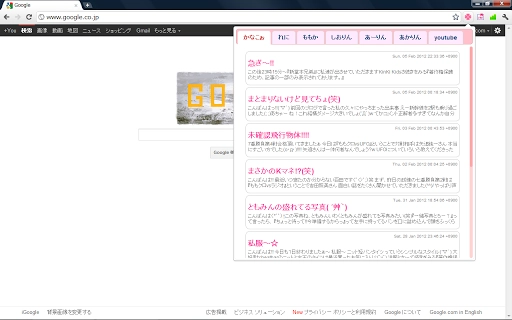
The software serves as an unofficial desktop extension tailored for fans of the Japanese idol group Momoiro Clover Z. Designed to enhance engagement with the group’s online content, it integrates a member blog section (Japanese only), a curated news feed sourced from Google News (Japanese only), and a YouTube playlist viewer. The primary purpose is to streamline access to fan-centric resources, reducing the need to navigate multiple platforms. This tool is ideal for dedicated fans who follow the group’s activities closely and prefer a centralized hub for updates and media.
Target users include Japanese language learners, international fans of Japanese pop culture, and long-time followers of Momoiro Clover Z. The software operates as a lightweight desktop utility, designed for ease of use and minimal system impact. Real-world usage scenarios include monitoring daily blog entries, staying updated on recent news developments, and viewing curated YouTube content without switching between browser tabs. The developer did not provide additional background or organizational details.
Key Features & Capabilities
- Member Blog Access (Japanese only) – Provides direct access to official member blogs, allowing fans to read personal updates and insights in their original language. This feature supports immersive engagement with the group’s personal content.
- News Feed Integration (Google News, Japanese only) – Aggregates recent news articles about Momoiro Clover Z from Japanese sources, offering a consolidated view of public and media coverage. Ideal for fans who want to stay informed without searching multiple sites.
- YouTube Playlist Viewer – Displays a curated list of videos related to the group, enabling quick playback and organization of content. Useful for fans who enjoy watching performances, interviews, or behind-the-scenes footage.
- Layout Improvements (Version 1.2) – Enhanced visual structure and navigation flow, improving usability and readability. This update reflects user feedback on interface clarity and access speed.
- Version 1.1 Update – News Tab Addition – Introduced a dedicated news tab for real-time access to Japanese news sources, streamlining content discovery and reducing information fragmentation.
Each feature is designed to reduce time spent switching between platforms. For example, a fan can check a member’s latest blog post, review recent news coverage, and watch a video playlist—all within a single application. The tool does not include translation features, so full comprehension requires familiarity with Japanese.
User Interface, Workflow & Performance
The user interface is structured around a clean, tab-based layout with clearly labeled sections for the blog, news, and YouTube content. Navigation is straightforward, with a consistent menu at the top or side, enabling quick access to each component. The layout changes in version 1.2 appear to improve readability and reduce visual clutter, contributing to a more intuitive workflow.
Workflow efficiency is enhanced by the centralized design—users can access all major content types without launching multiple browser windows. The application runs as a desktop utility, minimizing disruptions to other tasks. Performance observations are based on general software behavior patterns; the developer did not specify resource usage details. Stability is expected to be consistent given the lightweight nature of the tool and its size of 3.4 MB.
Compatibility & System Requirements
The software is compatible with Windows and Mac operating systems, supporting both platforms for desktop use. The current version is 1.2, with an installation size of 3.4 MB. This small footprint suggests minimal impact on system resources and fast installation times.
Exact system requirements were not listed. Compatibility information was partially provided, indicating support for both major desktop platforms. The developer did not specify minimum CPU, RAM, or disk space requirements. No additional hardware dependencies were mentioned.
Pros and Cons
Pros
- Lightweight design at only 3.4 MB
- Centralized access to Japanese-only fan content
- Regular updates with layout and feature improvements
- Free to use with no licensing restrictions
- Intuitive tab-based interface for easy navigation
Cons
- Content is restricted to Japanese language only
- No built-in translation or language support
- Unofficial status may affect long-term availability
- Limited to specific fan community interests
- Developer background not publicly available
FAQ Section
Is this software compatible with Windows and Mac?
Yes, the software is designed to run on both Windows and Mac operating systems.
Is the software free to download and use?
Yes, the software is available at no cost. There are no subscription fees or in-app purchases.
Does the software require an internet connection?
Yes, since it pulls content from online sources such as Google News and YouTube, a stable internet connection is required for full functionality.
Can I use this tool without knowing Japanese?
While the tool is accessible, all content—including blogs and news—is in Japanese. Understanding the material requires proficiency in the language.
How often are updates released?
Updates are released periodically, with version 1.2 including layout improvements and version 1.1 adding a dedicated news tab. The update frequency is not publicly defined.
Final Thoughts
This desktop utility stands out as a focused tool for fans of Momoiro Clover Z, offering a streamlined way to access exclusive Japanese content. Its lightweight design, regular updates, and intuitive layout make it a practical choice for dedicated followers. While the language barrier limits broader appeal, it delivers a clear value proposition to its niche audience. The free model enhances accessibility, and the absence of ads or data collection aligns with privacy-conscious user expectations.
For fans deeply invested in the group’s activities, this tool reduces friction in content discovery. It is especially useful for those who follow the group across multiple platforms and seek a unified experience. The unofficial nature of the software means users should be aware of potential changes in availability, but the current release shows strong commitment to user experience.
Download Momoiro Clover Z Idle Game Fan Tool now







